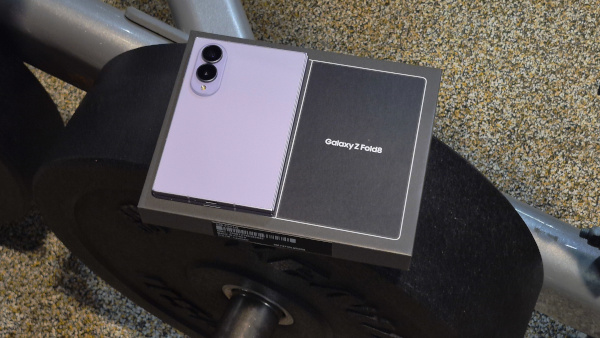
Samsung Galaxy Z Fold8 Review: Holding a storybook in the palm of my hand
October 8, 2026- Performance: Snapdragon 8 Elite Gen 5, 12 GB RAM
- Main Display: 7.6-inch QXGA+ AMOLED 2x
- Cover Display: 5.5”-inch WUXGA+
- Weight: 201g
- Storage: 256 GB
- OS/Software: Android 17, One UI 9
- Battery: 4,800mAh
- Features: 8K, 4K, 1080p video recording
- Rear Camera: 50 MP Main + 50MP Ultrawide
- Cover Camera: 10MP Cover Screen 4K video recording
- Under Display: 10MP 4K video recording
- Connectivity: Wi-Fi 802.11, Bluetooth 6.0, NFC
- Colour: Lavender
- Rating: 4/5
- Price: RM7299
A New Chapter in Samsung’s Foldable Journey
Samsung Malaysia Electronics has marked another milestone in August 2026 with the launch of its latest generation of foldable smartphones, introducing two different models: the Galaxy Z Fold8 and Galaxy Z Fold8 Ultra.
What immediately caught my attention is the form factor. Despite offering a larger, more versatile display experience, the Galaxy Z Fold8 still manages to fit comfortably into a pocket, making it surprisingly practical for a device that is designed to give users a tablet-like experience when unfolded.
But this new generation is not simply about making a foldable phone thinner, larger or more powerful. Samsung appears to be pushing the idea of foldables further into everyday productivity and mobile computing.
The response has certainly been strong. Global pre-orders for the Z8 generation reportedly increased by more than 30% compared with the previous generation, with the redesigned form factor playing a major role in driving demand.
Samsung also expanded its global production by approximately one million additional units shortly after launch to help meet demand and prevent potential inventory shortages across international markets.
In Samsung’s home market of South Korea, the new lineup recorded 1.44 million pre-orders within its first week, setting a new record and surpassing the pace of previous flagship launches.
So, the big question is: what makes the Galaxy Z Fold8 worth considering, especially when the price sits firmly in the premium category?
For me, it is not really about the cameras. What caught my attention is how the Galaxy Z Fold8 can be used as a working device. Having two displays available and being able to move between them makes a noticeable difference when handling emails, documents, multitasking, and other work-related tasks.
The price may initially look like it is over the roof, but when you look at the bigger picture, the real question is not simply “How much does it cost?” It is “What purpose does it serve, and how much value can you actually get from it?”
And that is exactly what I wanted to explore in this review.
Design
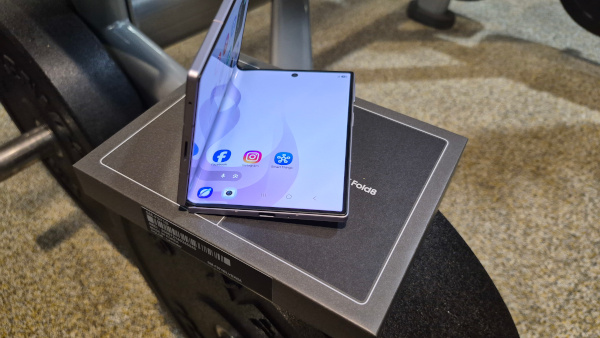
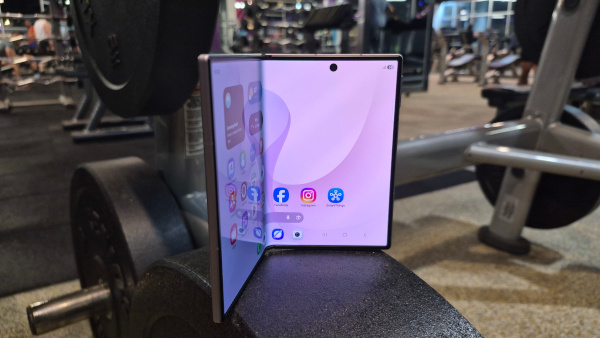
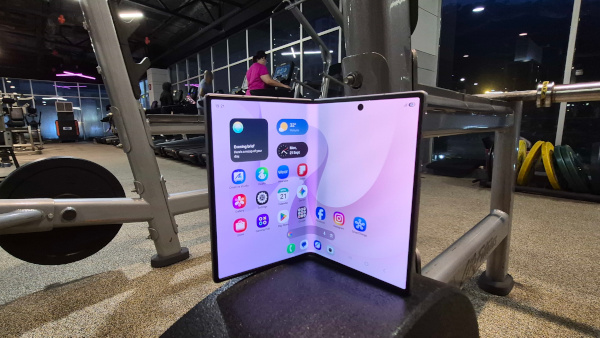
The design of the Galaxy Z Fold8 can best be described as minimalist, clean and understated. This is very much in line with the current design direction that appeals to younger users, including Gen Z, where simplicity and functionality often take priority over an overly complicated or flashy appearance.
At first glance, the Galaxy Z Fold8 does not try too hard to stand out. Instead, it keeps things simple and refined. Open it up, and you get the familiar tablet-like experience that has become the identity of Samsung’s Fold series. It is the kind of device that naturally attracts attention when you unfold it, yet remains relatively subtle when it is closed.

The 7.6-inch QXGA+ Dynamic AMOLED 2X Main Display provides the larger workspace, while the 5.5-inch WUXGA+ Cover Display is there for everyday tasks when you do not need to unfold the device. This dual-display approach makes the Fold8 particularly interesting for users who want a smartphone that can transform into something closer to a compact tablet whenever more screen real estate is needed.
Despite carrying a 4,800mAh battery and weighing around 201g, the Fold8 doesn’t feel as heavy or cumbersome as I expected. Once it is in your hand or slipped into a pocket, the weight becomes less noticeable, especially considering that you are carrying a foldable device with a large internal display.
Design-wise, Samsung has clearly chosen the minimalist route. No unnecessary design elements compete for attention. The overall appearance is clean, professional and easy to carry, making it suitable for a wide range of users regardless of personal style.
For me, this is where the Fold8 becomes more than just a foldable smartphone. When you are holding it closed, it looks professional and relatively conventional. Open it up, however, and the experience changes completely. The larger display gives it a more productive, almost tablet-like character.
That versatility is perhaps one of the strongest aspects of the design. Whether you are working, reading documents, browsing, watching content or simply multitasking, the Fold8 gives you the option of using it as a regular smartphone or opening it up when you need more space.
It may not have the most dramatic design in the smartphone market, but that is precisely the point.The Galaxy Z Fold8 keeps things simple, practical and professional—and sometimes, minimalist is exactly what works.
Cover Screen and Main Screen
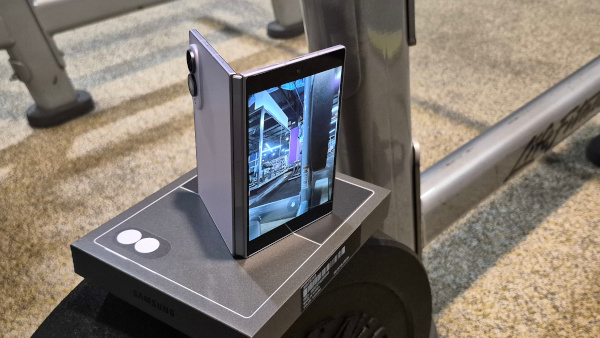
This is probably one of the biggest reasons why a foldable smartphone makes sense to me. The Galaxy Z Fold8 gives you two different screen experiences in one device—a more traditional smartphone experience on the outside and a much larger workspace when you unfold it.
The 5.5-inch WUXGA+ Cover Display is there for those moments when you simply want to get things done quickly. Checking notifications, replying to messages, browsing, checking emails, looking at social media or quickly responding to something does not always require you to open the phone.
But when the task becomes more demanding, that is when the 7.6-inch QXGA+ Dynamic AMOLED 2X Main Display comes into play.
The Cover Screen – Compact but Practical
When the Galaxy Z Fold8 is closed, the cover screen keeps the device feeling like a regular smartphone. This is important because not every task requires a large display.
For my daily workflow, I can quickly check an email, reply to a message, look at a notification or pull up information without having to unfold the device every single time. It feels more natural when you are constantly moving around and need quick access to your phone.
There is also something convenient about having that choice. Keep it closed when you need speed, open it when you need space.
The cover screen also plays an important role in keeping the Fold8 portable. Despite being a foldable device, it does not feel like I am carrying a small tablet around with me all the time. It can remain closed and compact in my pocket, and then transform into a much larger display whenever I need it.
The Main Display – Where the Fold8 Really Comes Alive
Now, unfold the Galaxy Z Fold8 and the experience changes completely.
The 7.6-inch QXGA+ Dynamic AMOLED 2X Main Display gives you significantly more space to work with, and this is where I personally found the biggest difference.
When I am working, having a larger screen means I can see more information at once instead of constantly scrolling or switching between applications. It becomes particularly useful when reading documents, checking emails, reviewing content, browsing websites or working with multiple pieces of information at the same time.
This is where the Fold8 starts to feel more like a compact tablet that happens to fit into your pocket.
And that is the beauty of the design. You are not forced to choose between carrying a smartphone and carrying a tablet. The Fold8 gives you both experiences in one device.
Thinness Without Losing the Foldable Experience
Samsung has also continued refining the physical design of the Fold series around portability.
At approximately 201g, with a thickness of around 4.5mm when unfolded, the Galaxy Z Fold8 is Samsung’s lightest Fold to date. Those numbers may sound like specifications on paper, but you can actually appreciate the difference when you are carrying and using the device throughout the day.
For a foldable with a large 7.6-inch display and a 4,800mAh battery, keeping the overall design slim and manageable is no small achievement.
The thinner design also makes the transition between the cover screen and main display feel more natural. When closed, it remains a device that you can carry around comfortably. When opened, you get that much larger canvas for productivity and entertainment.
Engineering Behind the Fold
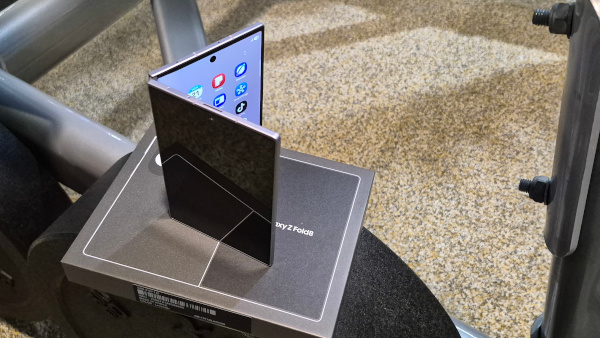
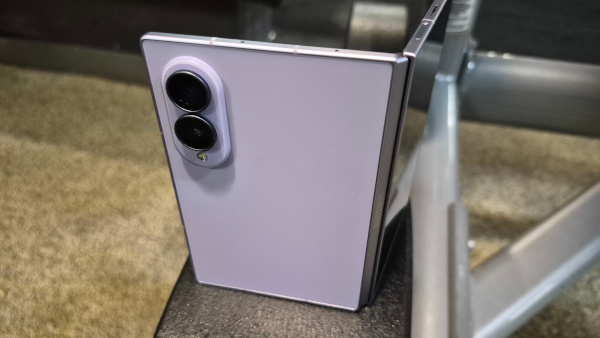
Of course, making a foldable thinner is not simply a matter of removing material or making individual components smaller. Samsung has had to refine the display structure, materials and internal architecture together.
The Fold8 and Fold8 Ultra introduce Flex Titanium, a titanium-based display structure that combines a titanium-alloy film with an enhanced titanium plate. The idea is to create a slimmer display structure while maintaining the durability expected from a foldable device and helping to reduce the visibility of the crease.
And while the engineering may not be something you immediately think about when using the phone, it is something you can appreciate through the overall experience. A foldable needs to balance thinness, portability and durability, and getting that balance right is what makes the device practical for everyday use.
Samsung says the Galaxy Z series undergoes more than 100 reliability validation tests, reflecting its approach to testing the complete device rather than focusing on just one component.
After years of developing foldable smartphones, Samsung has continued refining that balance between making the device thinner while maintaining the confidence needed for something that is designed to be opened and closed repeatedly.
Making the Bigger Screen Actually Useful
But having a large screen alone is not enough.
What matters to me is what I can actually do with it.
Samsung has continued developing One UI around the foldable experience, and the larger display is designed to make multitasking more practical. With Multi Window supporting up to three apps simultaneously, you can have different applications visible at the same time instead of constantly jumping back and forth between them.
For example, you could have information from one app alongside your notes or messages while keeping another application available for reference. For work, research or content creation, that extra screen space can make the workflow feel much less cramped.
Gemini Notebook also takes advantage of the larger display by bringing notes, images, recordings, files and documents together in one workspace. Instead of treating the Fold8 simply as a bigger phone, Samsung is making use of the additional screen real estate to create a more complete workspace for research, organisation and content creation.
The same idea carries over into editing. With Photo Assist, for example, the unfolded display can allow you to view the original image and the edited version side by side. That may sound like a small detail, but when you are editing content, being able to see both versions at the same time can make the process much easier.
My Take: Two Screens, Two Purposes
For me, this is where the Galaxy Z Fold8 makes the most sense.
The cover screen is for convenience, while the main display is for productivity, creativity, and getting more done.
I do not have to open the Fold8 every time I receive a message or need to check something quickly. But when I sit down to work, review content, edit photos, watch videos, or handle multiple tasks, unfolding the device gives me that additional space immediately.
That flexibility is what I appreciate most. It does not feel like Samsung simply added a bigger display for the sake of having one. The entire experience is built around giving you a reason to use both screens.
And perhaps that is the real appeal of the Galaxy Z Fold8: it stays a smartphone when you want it to, but when you need more, it opens up into something much bigger.
Software & Galaxy AI Integration
The Galaxy Z Fold8 is not just about having a larger screen that folds in half. For me, the real question is what can you actually do with that extra screen? This is where Samsung’s software experience and Galaxy AI integration start to make more sense.
Running One UI 9 with Gemini Nano 4 integration, the Fold8 is designed to take advantage of its larger inner display, giving users more room to multitask, work across multiple windows, and make use of AI-powered tools without constantly jumping between applications.
And honestly, this is one area where the Fold8 starts to feel less like a conventional smartphone and more like a pocket-sized productivity machine.
Contextual and Predictive Actions
One of the more interesting additions is Now Nudge, which is designed to understand what you are doing on the screen and provide relevant actions based on the context.
For example, if you are discussing plans for an upcoming event, Now Nudge can suggest opening your Calendar. If you are talking about meeting someone at a restaurant, it can offer to bring up Maps. Instead of manually leaving the application you are using, searching for another app and then entering the information again, the software attempts to bring the next action directly to you.
It may sound like a small convenience, but when you are constantly moving between messages, calendars, maps, emails, and other applications throughout the day, those small conveniences can add up to a much smoother workflow.
Gemini Notebook
For people who work with documents, meetings, or research material, **Gemini Notebook** is another feature worth paying attention to.
The AI can work with content such as PDFs, meeting notes, and voice recordings on the larger inner display, helping turn lengthy information into more manageable summaries. It can also assist in creating presentation slides or even generating quick practice quizzes from the information.
This is where the Fold8’s larger display becomes particularly useful. Reading a document on a conventional smartphone can sometimes feel cramped, but opening the Fold8 gives you a much larger workspace to review information while using AI tools alongside it.
For students, professionals, and anyone who spends a considerable amount of time going through documents, this could potentially save a considerable amount of time.
Agentic Multi-Step Automation
Samsung is also pushing Galaxy AI beyond simple questions and answers with agentic multi-step automation.
Instead of asking the phone to perform one individual task at a time, users can give it a more natural request involving several steps.
For example, you could ask it to find a flight confirmation in your email and add a reminder to your Calendar. Rather than manually opening your email, searching for the confirmation, checking the details and then creating a calendar reminder yourself, the AI is designed to handle the sequence of actions.
This is the direction I find particularly interesting because it moves AI from simply being something you talk to into something that can actually help you get things done.
AI for Calls and Communication
The AI experience is not limited to productivity either. Samsung has also integrated AI-assisted communication tools into the Fold8.
Audio & Call Assist can help reduce background noise during calls, while real-time call transcription can turn conversations into written text. Automatic call summaries can then make it easier to revisit the important points without having to remember or manually write everything down.
For work calls, interviews, or conversations where important information can easily get lost, this could be a genuinely useful feature.
Sketch to Image
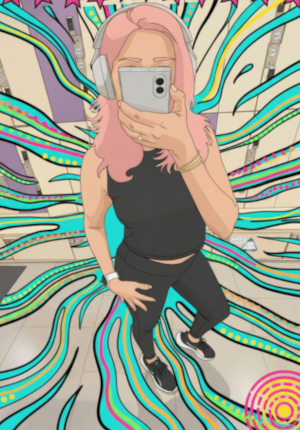
Then there is Sketch to Image, which takes a more creative approach to AI.
With the larger inner display, users can make a rough sketch using the screen or S Pen and have Galaxy AI transform that simple drawing into a more fully rendered image or graphic element.
You do not necessarily need to be a professional artist to experiment with it. A basic idea or rough drawing can become a much more polished visual, which could be useful when brainstorming concepts, preparing presentations or simply experimenting with creative ideas.
AI-Generated Wallpapers
Even something as simple as the wallpaper gets an AI touch.
The Fold8 can generate customised wallpapers based on descriptive prompts, allowing users to create something that feels more personal rather than relying solely on Samsung’s pre-installed designs.
The software can also arrange elements around widgets on the cover screen, helping maintain a cleaner layout instead of having your wallpaper and widgets competing for attention.
So, Does Galaxy AI Actually Matter?
This is where I think the Galaxy Z Fold8 becomes more interesting.
AI is becoming a standard feature across smartphones, so simply saying “this phone has AI” is no longer enough to impress me. What matters is whether those AI features actually make everyday tasks easier.
With the Fold8, Samsung has a significant advantage: the larger inner display gives Galaxy AI more room to work with. Multi-window applications, documents, notes, calls, and creative tools all benefit from having a larger canvas.
For my own use, the appeal is less about using AI for entertainment and more about productivity. The ability to have multiple things open, work across a larger display and let AI assist with some of the repetitive tasks makes the Fold8 feel much more practical as a work device.
That is ultimately what makes the software experience stand out. The Galaxy Z Fold8 is not simply trying to be a smartphone with AI added on top. It is trying to turn the combination of a foldable display, One UI, and Galaxy AI into a smarter way of working.
Camera
When it comes to the camera, I have to admit that I did not buy into the Galaxy Z Fold8 purely because of its camera capabilities. My main interest in the Fold8 has always been its productivity and how well it fits into my workflow. But after using the camera extensively, I honestly have very little to complain about.
I have used it to record everything from my workouts and daily activities to my work, content creation and even footage for video editing. The camera has been there whenever I needed to quickly capture something without having to carry another dedicated camera around.
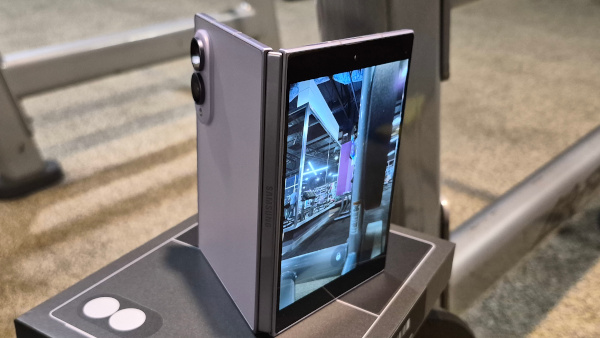
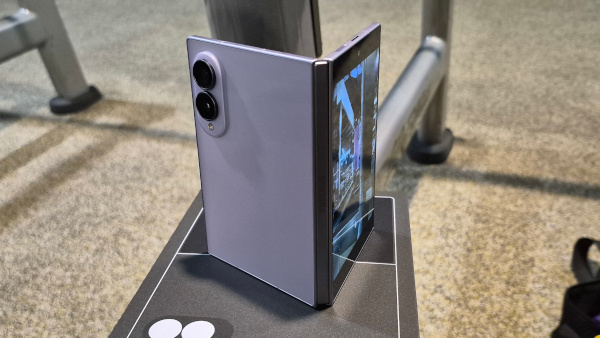
The Galaxy Z Fold8 comes equipped with a 50MP main camera and 50MP ultrawide camera on the rear, while the 10MP cover camera supports up to 4K video recording. There is also a 10MP under-display camera, which can record in 4K.
For video recording, the Fold8 supports 8K, 4K and 1080p recording, giving content creators plenty of flexibility depending on what they are shooting and how they plan to edit the footage later.
Day Photography

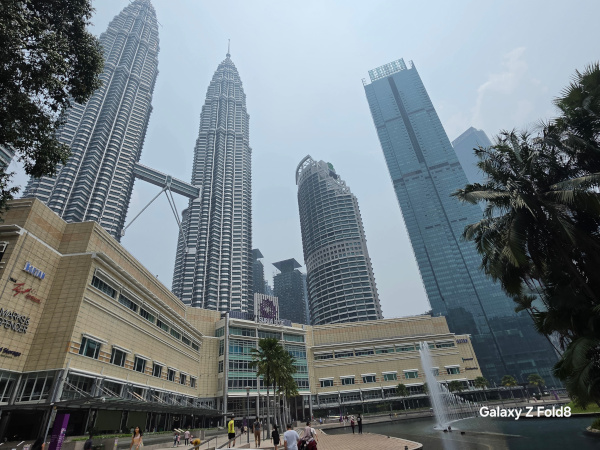

During the day, the Galaxy Z Fold8 performs well, especially when there is sufficient natural or ambient light.
For everyday photography, I would recommend keeping the zoom to around 3x or below if you want to maintain a cleaner and more natural-looking image. Once you start pushing the zoom further, you may notice a gradual loss of detail, so I would rather move closer to the subject whenever possible.

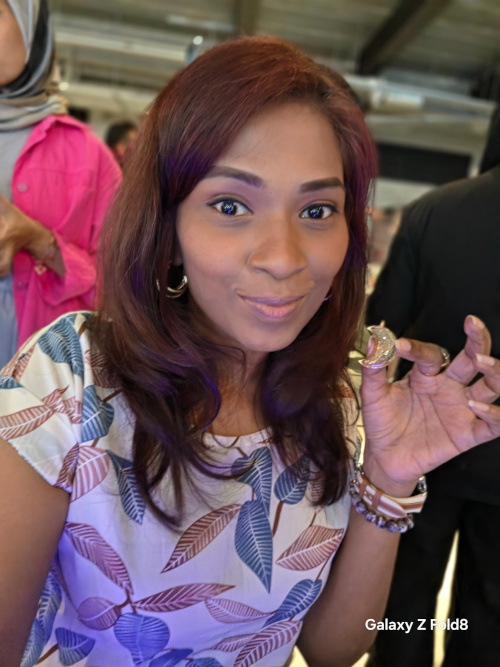
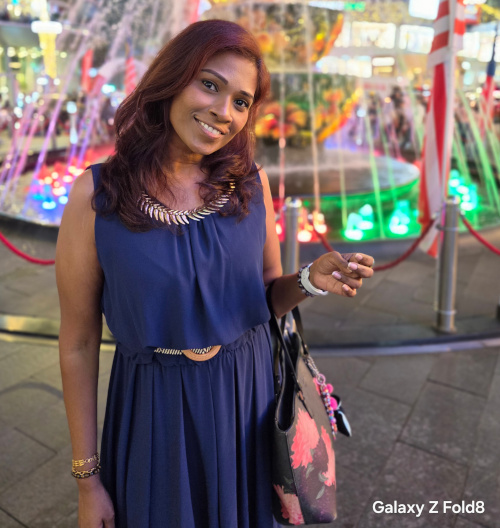
For portrait photography, my advice is similar: keep your subject relatively close rather than shooting from too far away. Getting closer helps the camera capture more detail and gives the portrait a more natural separation between the subject and background.
And yes, lighting still matters.
No matter how smart the camera or how advanced the processing is, good lighting can make a huge difference. If you are taking photographs, try to position yourself or your subject in an area with decent lighting. You do not need a professional lighting setup for everyday shots, but giving the camera enough light will generally result in better colours, detail and overall image quality.
Night Photography

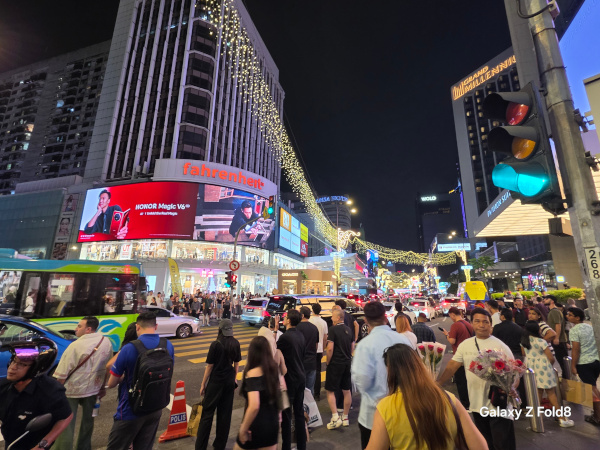

Night photography is where you will start to see some limitations.
When shooting in darker environments, especially when there is not enough available light, you may notice some noise appearing in the image. This is not unusual for smartphone cameras, but it is something to keep in mind if you are expecting extremely clean night shots.
My advice is simple: look for a stronger source of lighting whenever possible.
If you are photographing at night, try taking the shot in an area with street lights, building lights, shopfronts or other available illumination. The more light the camera has to work with, the better the final image is likely to look.
So, if you are heading out at night and want to capture cleaner photographs, do not immediately blame the camera. Sometimes, finding the right lighting can make a bigger difference than simply changing the camera settings.
Video Recording
Now, video recording is where I found myself using the camera more often than I expected.
Whether I was recording my workouts, work-related content or footage that I planned to edit later, the Galaxy Z Fold8 handled video recording confidently. I am not going to pull any punches here—the video quality is good, whether you are shooting during the day or in lower-light conditions.
The Fold8 gives you several recording options, including UHD 60fps, which is worth trying if you want smoother footage, particularly when recording movement. For workouts, action shots or anything where the subject is moving around, the higher frame rate can make the footage feel noticeably smoother.
And if you have plenty of storage available and want to experiment with higher-resolution footage, give the 8K recording mode a try. It gives you more resolution to work with during post-production, although the resulting files will naturally take up considerably more storage.
For my workflow, this flexibility is important. Sometimes I just need to pull out the phone and record. Other times, I want footage that I can bring into my editing software and work with later.
Battery Tech, Thermal Engineering & Real-World Heat
Samsung gave the baseline Galaxy Z Fold 8 a substantial internal upgrade by shifting to high-density silicon-carbon battery chemistry. This allows the phone to pack a 4,800 mAh dual-cell capacity into a thinner profile—a full 400 mAh jump over the Fold 7. Supported by upgraded 45W wired fast charging, the device reliably recovers over 60% of its battery in roughly 30 minutes.
To achieve this slimmer and lighter chassis, Samsung made a key engineering trade-off: the Galaxy Z Fold 8 omits a traditional liquid vapor chamber.
While vapor chambers were standard through the Fold 6, Samsung first phased them out on the Fold 7, opting instead for multi-layered graphite heat-dissipation sheets—a thermal strategy carried straight into the Fold 8.
The Review Trade-Off: Heat vs. Ergonomics
Chassis Heat: Graphite sheets cool internal components by drawing thermal energy away from the silicon and rapidly dispersing it across the phone’s outer skin. As a result, you feel heat directly through the frame and back glass, causing noticeable surface warmth during moderate-to-heavy use.
Thermal Throttling Under Load: Without the liquid-phase cooling of a vapor chamber to absorb sustained thermal peaks, extended 3D gaming, camera recording, or heavy split-screen multitasking can quickly ramp up internal temperatures. This triggers performance throttling to keep thermals under control.
The Bottom Line for Buyers: The decision to skip a vapor chamber isn’t a total dealbreaker, but it is a clear compromise. Samsung prioritized a thinner, lighter everyday carry with better total battery life over sustained peak performance under heavy, long-term processing loads.
My Overall Take on the Galaxy Z Fold8
After spending time with the Galaxy Z Fold8, I can honestly say that this is a device that fits the way I work and move throughout the day.
I am the kind of person who constantly multitasks. I am jumping between work, emails, content, social media, documents and video editing, often while I am away from my desk. What I really need is something that gives me the feeling of having a PC in the palm of my hand—without actually having to carry a laptop everywhere I go.
And this is where the Galaxy Z Fold8 makes the most sense to me.
The larger inner display gives me the space I need to work, while the cover screen keeps everything quick and convenient when I am on the move. When I want to edit videos, review content, go through documents, or simply have more room to work with, I can unfold the device and immediately get that bigger workspace.
It has become the kind of companion that I can bring almost anywhere. Work, travel, gym, events or simply sitting in a café—there is something about having a large screen that folds back into a pocketable smartphone that makes life a little easier.
One of the things I genuinely love about the Fold8 is the feeling of reading or viewing content on that larger display. At times, it almost feels like I am holding a storybook in the palm of my hand. You open it, settle into the larger screen, and suddenly the experience becomes more immersive.
And for someone like me who enjoys video editing while being on the move, this is where the Fold8 really connects with my workflow. I do not always want to wait until I get back to my computer before I can work on something. Having that additional screen space means I can start editing, reviewing or preparing content wherever I happen to be.
Is the Price High?
Let’s address the obvious question—the price.
Yes, the Galaxy Z Fold8 sits firmly in the premium category, and the price may initially feel sky-high compared with a conventional smartphone.
But I think the better question is not simply “How expensive is it?” It is “What am I getting out of it every day?”
If you are someone who mainly uses a smartphone for calls, messaging, social media and occasional photography, you may not necessarily need everything the Fold8 offers.
But if you are constantly on the go, multitasking, working across multiple applications, editing content, reading documents, and trying to keep up with a busy schedule, the story changes.
For that type of user, the Fold8 is not simply another smartphone. It can become a mobile workspace, entertainment screen, productivity tool, and creative companion—all folded into one device that you can still carry in your pocket.