Samsung Expands One UI 9 to More Galaxy Devices with New AI and Security Features
September 23, 2026Samsung is expanding One UI 9 to more Galaxy devices, with the rollout beginning with the Galaxy S26, Galaxy S26+ and Galaxy S26 Ultra.
Following its debut on the Galaxy Z Fold8 Ultra, Galaxy Z Fold8 and Galaxy Z Flip8, the latest One UI update brings a more seamless experience across different Galaxy form factors, while expanding Galaxy AI with new tools designed to make everyday tasks easier, more personalised and more useful.
From automatically reframing videos to improving translated conversations and making device care easier to manage, One UI 9 focuses on reducing the number of steps users need to take.
Keep the Right Person in Focus with My FanCam
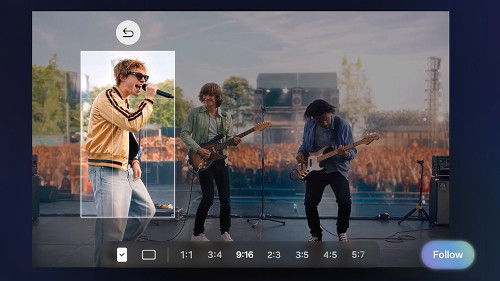
One of the more interesting additions is My FanCam, which automatically tracks a selected person in a recorded video and keeps them centred as the scene moves.
This means users can record a performance, sporting event or even a friend dancing and let the phone intelligently reframe the footage afterwards.
Instead of manually editing the video to keep someone in frame, My FanCam can turn the recording into more social-ready content with less effort.
Make Now Brief More Personal
Samsung is also giving users more control over what appears in Now Brief.
The new Generative and Editable Cards allow users to customise the information included in their daily summaries, with cards covering areas such as health, weather and video.
Rather than receiving exactly the same type of daily information, users can tailor the brief around the things they actually want to see.
Device Care Is Now Easier to Find
One UI 9 also puts more device support directly into the Settings menu with Warranty and Care.
Users can check warranty coverage across connected Galaxy devices, run self-diagnostics, view repair estimates, manage Samsung Care+ and even book a service appointment from the same place.
For anyone who has ever had to search through different support pages or menus to find warranty or repair information, this could make device management considerably simpler.
Now Nudge Helps You Take the Next Step
Samsung is also expanding Now Nudge, which provides context-aware suggestions based on what users are doing.
For example, while making plans through text messages, Now Nudge can surface reservation details or help save a shared location without requiring users to leave the conversation.
The idea is simple: instead of making users stop what they are doing to open another app, Galaxy AI can suggest the next relevant action within the current workflow.
Creative Studio Gets More Helpful
Creative Studio is also becoming more proactive.
The feature can suggest image-generation ideas based on upcoming events. For example, when a friend’s birthday is approaching, users could receive a prompt to create a themed image or greeting.
This turns AI image generation into something more contextual rather than simply requiring users to start from a blank prompt.
Interpreter Makes Translated Conversations Easier to Follow
For users who regularly communicate across languages, Interpreter receives a useful update with its new Thread View.
It allows users to refer back to earlier parts of a translated conversation, making longer exchanges easier to follow.
Samsung is also improving translation speed in Conversation Mode, while compatible Galaxy Buds can provide quicker audio playback, helping conversations feel more continuous.
Document Scan Gets Smarter
One UI 9 also improves Document Scan, particularly when dealing with less-than-perfect documents.
Users can digitise challenging materials such as curved book pages and papers with folded corners with less manual adjustment.
On compatible Galaxy devices with larger displays, optimised views and an improved Finger Eraser are designed to make scanned documents cleaner and easier to use.
Voice Recorder Summaries Are Easier to Read
For meetings, interviews or personal recordings, Voice Recorder now presents summaries in a more structured format.
Instead of receiving a wall of information, summaries can use elements such as headings and tables, making key points easier to scan quickly.
More Security Information, Right Where You Need It
Samsung is also expanding the security and privacy tools within One UI 9.
Security Brief brings important security information into Now Brief, including alerts relating to malware, apps from unknown sources and unnecessary permissions.
The aim is to help users spot potential security issues earlier and understand when they may need to take action.
Meanwhile, Privacy Alerts use on-device AI to identify potential privacy risks, including unnecessary attempts by apps to access permissions in the background.
Scam Detection Expands
Samsung is also expanding Scam Detection to additional countries and languages, bringing protection against potential scam calls to more Galaxy users in supported markets.
With phone scams becoming an increasingly common concern, having more security features built directly into the Galaxy experience gives users another layer of awareness when dealing with suspicious calls.
One UI 9 Is About Making Galaxy Feel More Personal
With One UI 9, Samsung is not simply adding more features to Galaxy devices. The update focuses heavily on making existing smartphone tasks require fewer steps.
Whether it is automatically keeping someone centred in a video, suggesting the next action in a conversation, creating more personalised daily summaries, scanning difficult documents or highlighting potential security risks, the latest update continues Samsung’s push towards a more context-aware Galaxy experience.
The rollout begins with the Galaxy S26 series, following its initial debut on Samsung’s latest foldable devices, with availability expanding to more compatible Galaxy devices.